🧩 Ever had an API error that plays by its own rules?
This week, I ran into a mysterious bug.
Our app handled most API errors gracefully—404s, 500s, all fine. But when a 401 Unauthorized popped up, things got weird.
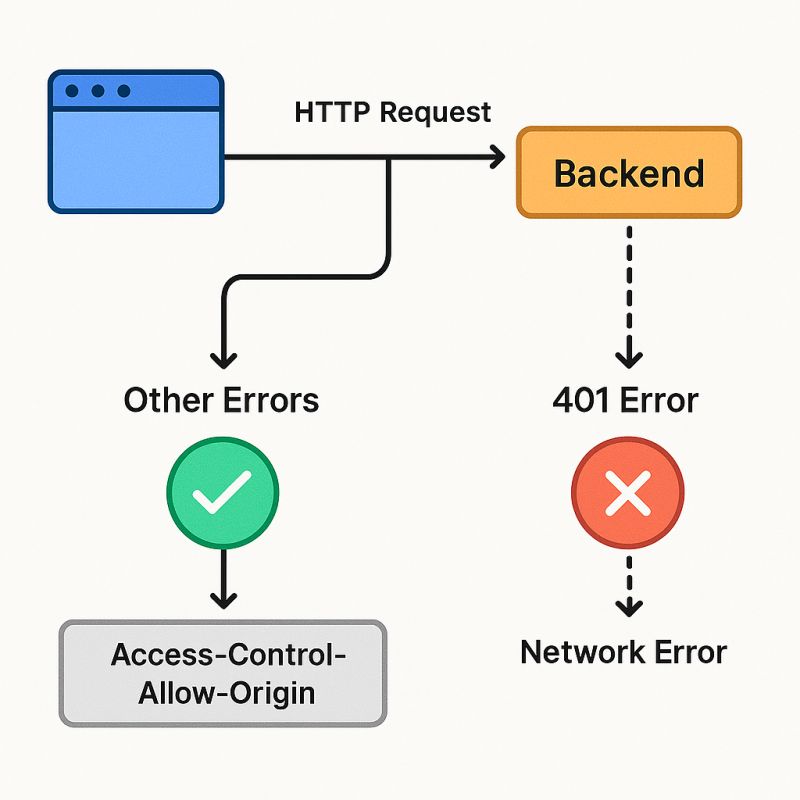
The browser's Network tab clearly showed the 401. But in JavaScript? Just a vague "Network Error". No status code, no message—just silence. 🤯
💡 What I Learned: 401 Errors Can Go "Invisible" in JavaScript
Turns out, it wasn't a typical CORS issue. The real culprit?
The backend wasn't sending Access-Control-Allow-Origin for 401 responses.
While all other responses (2xx, 404, 500) included proper CORS headers, the 401s did not. As a result, the browser blocked access to the error details—without even throwing a CORS error.
🛠️ How I Solved It
I dug deep—confirmed that other errors worked fine, which ruled out my client logic.
Then I routed the call through a Vite dev proxy. Since the proxy makes requests appear same-origin, the CORS checks were bypassed—and boom 💥, the 401 became visible in JavaScript.
That confirmed it: the issue was with the backend's header handling only on 401s.
🚀 Why This Matters
This bug was a perfect reminder:
- ✅ Backend error handling must be consistent across all responses.
- ⚠️ In many setups, the 401 is sent early by an auth layer—before the CORS middleware runs. That one line of middleware order can make or break error visibility.
If your frontend isn't catching a specific error type, check:
- CORS headers on all error paths
- Auth middleware vs. global middleware order
Sometimes the bug isn't in what's broken—it's in what's slightly, silently different.
Have you ever battled an oddly-behaved API error? I'd love to hear how you solved it 👇
#WebDevelopment #Frontend #Debugging #JavaScript #CORS #API #DevLife #TIL #SoftwareEngineering